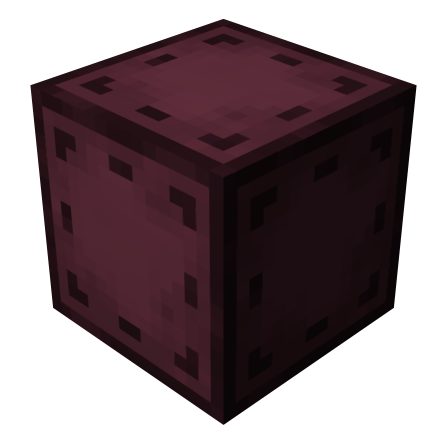
Entangled Mod Guide: Instant Block Linking Across Any Distance
Entangled lets you bind two blocks together so they function as one, enabling instant transfer of items, energy, fluids, and any other capability across unlimited distance and even between dimensions. With just two craftable items, this lightweight mod solves cable management and long-distance logistics in the simplest way possible.
Overview
Entangled is a beautifully simple utility mod that adds exactly two items: the  Entangled Block and the
  Entangled Binder. Together, they let you link any two blocks so that interacting with the Entangled Block is identical to interacting with the original target block. Items, energy, fluids, and any other Forge capability transfer instantly with no cables, pipes, or conduits required.
The binding works across unlimited distance by default, and even across dimensions. Place an Entangled Block next to your machinery, bind it to a Chest in your storage room on the other side of your world, and machines can push items directly into that remote Chest. The Entangled Block visually displays a spinning preview of whatever block it's bound to, so you always know what it's connected to at a glance.
You can browse the mod's recipes and items using the tabs at the top of this page.
Getting Started
- 1
Craft an Entangled Binder
The
Entangled Binder is the tool that stores block coordinates. You'll need two Ender Pearls, one Diamond, and two Obsidian. The Binder has a max stack size of 1, so you only need one. - 2
Craft an Entangled Block
The
Entangled Block is the proxy that will mimic your target. It requires four Ender Pearls, four Obsidian, and a Chest. Craft as many as you need for different connections. - 3
Select a Target Block
Right-click any block in the world with the
Entangled Binder. You'll see a yellow message confirming the selection. The Binder's tooltip will show the target block's name, coordinates, and dimension. - 4
Bind the Entangled Block
Place your
Entangled Block wherever you want the proxy. Then right-click it with the Entangled Binder that has a stored target. The Entangled Block will activate and begin displaying a spinning preview of the bound block inside it. Any machine, Hopper, or pipe connected to the Entangled Block will now interact with the remote target. - 5
Test the Connection
Try placing a Hopper on top of the
Entangled Block and dropping items in. They should appear in the remote target block instantly. This works for any interaction: item insertion, extraction, energy input, fluid piping, and Redstone signals from compatible mods.
How Entangled Blocks Work
The Entangled Block functions as a capability proxy. When any mod or vanilla mechanic queries the Entangled Block for capabilities (item handling, energy storage, fluid tanks), it transparently forwards that request to the bound target block. This means it works with virtually every mod that uses Forge's capability system: Hoppers, pipes from Mekanism or Thermal Expansion, energy cables from any tech mod, and fluid conduits all treat the Entangled Block as if it were the original target.
The block has a hardness of 1.0 and a blast resistance of 2.0, making it about as durable as Stone. It requires a Pickaxe to mine efficiently. When the Entangled Block is bound to a target, it visually renders a spinning preview of that block inside its frame, giving you an immediate visual indicator of what it's connected to.
What You Can't Bind To
You cannot bind an Entangled Block to another Entangled Block. The mod explicitly prevents chaining to avoid infinite loops. You also cannot bind a block to itself. Additionally, modpack makers can use the entangled:invalid_targets block tag to prevent specific blocks from being targeted.
When you break a bound Entangled Block, it retains its binding data in the dropped item. The tooltip will show which block it's bound to, including coordinates and dimension. When you place it again, the binding is restored automatically, as long as the target is still within range and dimension restrictions.
The Entangled Binder
The Entangled Binder is the selection tool that stores a target block's coordinates, dimension, and block state. It does not stack (max stack size of 1), but one Binder is all you'll ever need since it can be reused indefinitely by selecting new targets.
To select a target, right-click any block in the world. The Binder stores the block's exact coordinates and dimension, and its tooltip updates to show the target name, position, and dimension. To clear a stored selection, crouch and right-click while holding the Binder in the air (not aimed at a block).
Unbinding and Rebinding
To unbind an Entangled Block that's already linked to a target, select an empty slot on your hotbar, crouch, and right-click the Entangled Block. You'll see a yellow confirmation message and the block will return to its unbound state, no longer showing the spinning preview. From there, you can bind it to a new target using the Binder as usual.
This makes Entangled Blocks fully reusable. If you rearrange your base or move a storage system, simply unbind the old connections and rebind them to the new locations.
When binding across dimensions, the Entangled Block can only access the target's capabilities while the target chunk is loaded on the server side. If the target dimension isn't loaded (no players present and no chunk loaders active), the connection will be inactive until someone enters that dimension or the chunk is loaded by other means.
Practical Use Cases
Remote Storage Access
The most common use is linking an Entangled Block next to your machines to a Chest or storage system elsewhere in your base. Machines push output directly into the remote storage without any physical connection. This is especially powerful for multi-floor bases or when your processing area is far from your storage room.
Extra Sides for Automation
A block in Minecraft only has six sides, which limits how many machines or pipes can connect to it. By binding multiple Entangled Blocks to the same target, you effectively give that target additional sides to work with. Need eight pipes feeding into one Chest? Bind two Entangled Blocks to it and connect pipes to both the original and the proxies.
Cross-Dimensional Resource Transfer
Bind an Entangled Block in the Overworld to a storage block in the Nether. Your Nether mining operation can dump items into a Chest that's instantly accessible from your Overworld base. This eliminates the need to carry resources through portals manually.
Hidden Cable Management
For builders who care about aesthetics, Entangled Blocks completely eliminate visible cables and pipes. Place the messy tangle of conduits in a hidden room, then use Entangled Blocks at the visible connection points. Your build stays clean while the automation runs seamlessly behind the scenes.
Mod Compatibility
Entangled integrates with The One Probe and WAILA/HWYLA, so when you look at an Entangled Block with either of those info mods installed, you'll see details about what block it's bound to. The block works with any mod that uses Forge capabilities, which covers the vast majority of tech mods, storage mods, and automation mods.
Some blocks have render issues when displayed inside the Entangled Block's spinning preview. Tinkers' Construct Smelteries and Foundries are blacklisted from rendering by default. Modpack makers can add additional blocks to the entangled:render_blacklist block tag or the entangled:render_blacklist block entity type tag to prevent visual glitches. The block will still function correctly even if the preview is blacklisted.
Configuration
Entangled has a small but important configuration file. Server operators and modpack makers should pay attention to the first two options, as they directly affect gameplay balance.
Configuration Options
| allowDimensional | true (default) — Whether Entangled Blocks can bind across dimensions |
| maxDistance | -1 (default, unlimited) — Maximum binding range in blocks. Only applies within the same dimension |
| renderBlockHighlight | true (default) — Client-side. Highlights the bound target block when looking at an Entangled Block |
| rotateRenderedBlock | true (default) — Client-side. Whether the bound block preview spins inside the Entangled Block |
Changing allowDimensional or maxDistance only affects new bindings. Previously bound Entangled Blocks will continue to work even if the new config would normally prevent that binding. This prevents accidentally breaking existing setups when tightening restrictions.
Frequently Asked Questions
Does the Entangled Block work across dimensions?
Yes, by default. Select a block in one dimension with the Entangled Binder, then travel to another dimension and right-click an Entangled Block to bind it. The target chunk must be loaded for the connection to be active. Server operators can disable this via the allowDimensional config option.
Can I chain multiple Entangled Blocks together?
No. The mod explicitly prevents binding an Entangled Block to another Entangled Block. Each Entangled Block must target a non-Entangled block directly. However, you can bind multiple Entangled Blocks to the same target block, effectively giving it extra connection sides.
Why is my Entangled Block not transferring items?
The most common cause is that the target block's chunk is not loaded. Entangled Blocks only work when the target chunk is active. If you're far from the target or it's in another dimension without players, use a chunk loader mod to keep the area loaded. Also verify the target block hasn't been broken or replaced since the binding was created.
How do I unbind an Entangled Block?
Select an empty slot on your hotbar, hold crouch (Shift), and right-click the Entangled Block. You'll see a yellow confirmation message and the block will revert to its unbound state. You can then bind it to a new target.
Does breaking an Entangled Block lose the binding?
No. When you mine a bound Entangled Block, the dropped item retains its binding data. You can see the bound block's name, coordinates, and dimension in the item tooltip. Placing it again will restore the connection, provided the target is still within the configured range and dimension restrictions.
Is there a limit to how many Entangled Blocks I can use?
There is no hard limit built into the mod. You can place as many Entangled Blocks as you want, and multiple blocks can be bound to the same target. Keep in mind that each bound Entangled Block ticks every game tick to track its target's state, so extremely large numbers may have minor performance implications on lower-end servers.