Jonn's Trophies Mod Guide: Collectible Mob & Item Trophies for Minecraft
Jonn's Trophies adds collectible trophy blocks that drop when you kill mobs in Minecraft. Every vanilla and modded entity is supported, and trophies can be customized with different base blocks, scales, armor, and weapons. They even play mob sounds when powered by Redstone and can be worn on your head.
Overview
Jonn's Trophies is a decoration and collectible mod that adds a single, incredibly versatile block: the Trophy. When you kill a mob, there's a configurable chance it will drop a miniature version of itself mounted on a base block. These trophies work with every vanilla entity and every modded entity automatically, making them a natural fit for any modpack.
Beyond mob drops, trophies can also display any item in the game, including modded items. You can customize the scale, vertical offset, base block, and even dress entity trophies in Armor and hand them Weapons. Trophies play their mob's ambient sound when activated by Redstone, and you can wear them on your head. They make excellent quest rewards, decoration pieces, or collection goals for completionist players. You can browse all items this mod adds using the tabs on this page.
Getting Started
- 1
Kill a mob to get your first Trophy
Trophies drop automatically when you kill mobs. Regular mobs have a 2% base drop chance, while boss entities (like the Wither and Ender Dragon) have a 20% chance. Just play the game normally and trophies will start appearing in your inventory. The Looting enchantment increases your odds by giving additional rolls on the drop chance.
- 2
Place your Trophy and customize the base
Place the Trophy block like any other block. By default, trophies sit on a Smooth Stone Slab base. To change the base, simply right-click the placed Trophy while holding any Slab block. The base will swap to whatever Slab you're holding. Any block in the trophymanager:trophy_base tag can be used as a base, which includes all Slab variants by default.
- 3
Adjust scale and position
Right-click a placed Trophy with an empty hand to open the Trophy editing GUI. This screen has controls for Scale (how large the entity appears) and Y Offset (how high above the base it floats). Use the + and - buttons to adjust values in increments of 0.1, or hold Shift to adjust in increments of 1.0. Press OK to save your changes. By default, any player can edit trophies; server operators can restrict this in the config.
- 4
Equip armor and weapons on entity Trophies
Entity trophies that display mobs can be dressed up with equipment. Right-click a Trophy while holding any Armor piece to equip it in the correct slot (Helmet, Chestplate, Leggings, or Boots). Right-click with a Sword, Pickaxe, or other tool to place it in the mob's main hand, or use a Shield to equip the off-hand. Right-click with the same item again to remove it. This works on any mob that can normally wear equipment.
- 5
Wear a Trophy on your head
Every Trophy item can be equipped in the Helmet slot. Place it in your head armor slot to walk around with a miniature mob or item on top of your head. If you have the Curios mod installed, trophies also work in the Curios head slot for even more flexibility.
When the Looting enchantment is active, the game rolls the drop chance multiple additional times equal to 1 + your Looting level. With Looting III, you get 4 total rolls on the 2% mob drop chance, significantly increasing your odds of getting a Trophy.
Trophy Types
Jonn's Trophies supports three distinct trophy types, each displaying something different on the base block.
Entity Trophies
Entity trophies are the most common type. They display a miniature, fully animated 3D model of any entity in the game. When a mob drops a trophy naturally, it creates an entity trophy. The mod preserves variant data for entities that have visual differences, so an Axolotl trophy will retain its color variant, a Cat trophy keeps its skin pattern and collar color, and a Villager trophy preserves its profession and biome appearance. The full list of preserved NBT tags includes variants for Axolotl, Cat, Wolf, Frog, Llama, Horse, Fox, Parrot, Panda, and Mooshroom, plus custom types from compatible mods like Productive Bees.
Item Trophies
Item trophies display any item or block from the game on a pedestal. By default, item trophies slowly rotate on their base, which can be toggled off in the configuration. These are great for showcasing rare items or quest rewards. Item trophies must be created via commands or NBT editing, as they don't drop naturally from gameplay.
Player Trophies
Player trophies display a player's model and skin. The player trophy drop feature is marked as a work-in-progress but is available in the config. When enabled, killing another player has a 100% default drop chance for their trophy. These are primarily useful for PvP servers or adventure maps.
Redstone Sound Effects
Entity trophies are interactive in a surprising way: they play sounds when they receive a Redstone signal. When a Redstone pulse reaches a Trophy block, the entity's ambient sound plays. A Creeper trophy hisses, an Ender Dragon roars, a Bee buzzes, and a Ghast either screams or whines (chosen randomly). This makes trophies fantastic for building custom sound systems, adventure map triggers, or just adding ambience to a trophy room.
Some entities have special sound behavior. Llamas and Trader Llamas have a 10% chance to spit when powered. Goats have a 50% chance to play their screaming variant sound versus their normal ambient sound. Any mob not explicitly handled by the mod will still play its generic ambient sound through the entity system, so even modded mob trophies make noise when powered.
Trophies can be waterlogged, making them suitable for underwater displays. Place a Trophy in water and it will coexist with the water source block, letting you build aquariums or underwater trophy halls.
Custom Trophies with Commands
While trophies drop naturally from killing mobs, the real power of this mod comes from creating custom trophies via commands. Server operators and modpack creators can craft trophies for any entity or item in the game using NBT data. This is essential for quest rewards, adventure maps, and curated modpack experiences.
NBT Structure
Every trophy is defined by a set of NBT tags on the trophymanager:trophy item. The required tag is TrophyType, which must be "entity", "item", or "player". For entity trophies, you provide a TrophyEntity compound with an entityType string (like "minecraft:creeper"). For item trophies, you provide a TrophyItem compound with an id string (like "minecraft:diamond_sword"). Optional tags include Name (display name), Scale (size multiplier, default 0.5), OffsetY (vertical position, default 0.5), RotX (X-axis rotation), and BaseBlock (the base block ID, default "minecraft:smooth_stone_slab").
Example Commands (1.20.1)
To create a Wither Trophy on a Quartz Slab base, scaled to 75%:
/give @p trophymanager:trophy{"TrophyType":"entity","TrophyEntity":{"entityType":"minecraft:wither"},"Scale":0.75,"OffsetY":0.25,"BaseBlock":"minecraft:quartz_slab","Name":"Wither Trophy"}
To create an Item Trophy displaying a Wooden Hoe:
/give @p trophymanager:trophy{"TrophyType":"item","TrophyItem":{"id":"minecraft:wooden_hoe"},"Name":"Super Hoe Trophy"}
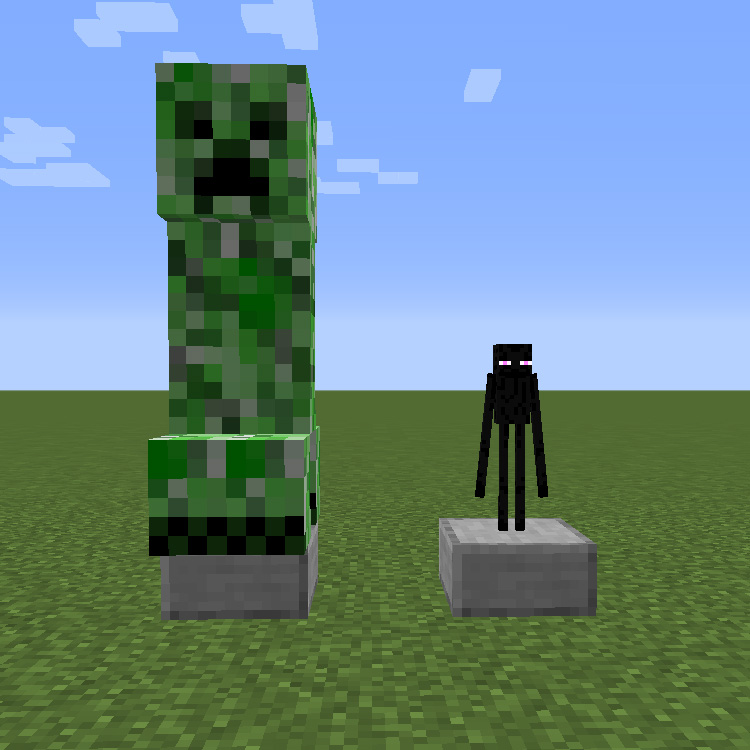
To create a large Creeper Trophy with double scale:
/give @p trophymanager:trophy{"TrophyType":"entity","TrophyEntity":{"entityType":"minecraft:creeper"},"Scale":2.0,"Name":"Creeper Trophy"}
The maximum trophy scale is 20.0 and the maximum Y offset is 2000.0 by default. These limits are enforced both in the GUI and when receiving network packets, so they can't be bypassed. Server operators can adjust these limits in the config if needed.
Special Entity Adjustments
When trophies are created from mob kills, certain entities receive automatic scale and offset adjustments to look correct on the base. The Ender Dragon is scaled down to 0.1 (10% size) with a Y offset of 0.8 to fit on the pedestal. The Ghast is scaled to 0.4 with a Y offset of 1.4 to account for its large model. Flying mobs like Bees, Phantoms, and Vex get a higher Y offset of 0.8 so they hover above the base. The Glow Squid is scaled to 0.4 with a 70-degree X rotation so it appears to float naturally rather than standing upright. Shulkers default to a lime green color with a partially opened shell.
Baby mobs are also preserved. If the killed entity had a negative Age value (indicating a baby), the trophy will display the baby version. Pufferfish trophies default to the partially inflated state.
Default Drop Chances
| Regular Mobs | 2% (0.02) |
| Boss Entities | 20% (0.2) |
| Players (WIP) | 100% (1.0) |
| Looting Effect | Additional roll per level |
| Fake Players (Machines) | Allowed by default |
Configuration
Jonn's Trophies uses a server-side config file with extensive options for tuning the mod's behavior. All settings are found in the server config under the General section.
Drop Settings
The dropFromMobs option (default: true) controls whether mobs drop trophies at all. Set this to false if you want trophies to only come from quests, recipes, or commands. The dropFromPlayers option (default: false, marked WIP) enables player trophies on PvP kills. The dropChanceMobs (default: 0.02), dropChanceBoss (default: 0.2), and dropChancePlayers (default: 1.0) options set the probability for each category. The applyLooting option (default: true) determines whether the Looting enchantment gives extra chances, and allowFakePlayer (default: true) controls whether automated killing machines can trigger trophy drops.
Display Settings
The defaultScale (default: 0.5) and defaultYOffset (default: 0.5) control how trophies appear when first dropped. The defaultBaseBlock (default: "minecraft:smooth_stone_slab") sets which block appears under naturally dropped trophies. If you change this to a full block, set defaultYOffset to 1.0; for Carpets, use 0.1. The maxSize (default: 20.0) and maxYOffset (default: 2000.0) cap how large or how high players can adjust trophies. The rotateItemTrophies option (default: true) makes item trophies slowly spin on their base.
Permission Settings
The allowNonOpEdit option (default: true) lets any player right-click a trophy to adjust its scale and Y offset. Set this to false if you want only server operators (permission level 2+) to modify trophies. This is useful for public servers where you don't want players resizing trophies placed as decorations.
NBT Map
The nbtMap config option is a comma-separated list defining which NBT tags should be saved when creating entity trophies. The format is modid:entityid:tag, for example "minecraft:cat:Variant". This preserves visual differences like cat patterns, horse colors, and frog variants. Modded entities can be added to this list to preserve their custom NBT data on trophies.
Mod Compatibility
Jonn's Trophies is designed to work with any mod that adds entities or items. All modded mobs will automatically drop trophies when killed, using the same configurable drop chances as vanilla mobs. The mod includes built-in Curios API support, registering trophies as a valid head slot Curios item so players can wear them alongside other Curios equipment.
The mod also includes a special integration with The Bumblezone. When a player earns the "Journey's End" advancement (the_bumblezone:the_bumblezone/the_queens_desire/journeys_end), they automatically receive a Queen Bee trophy. Earning the "Queen Beehemoth" advancement grants a Beehemoth trophy. These are added directly to the player's inventory.
The NBT map config supports modded entity variants out of the box. Productive Bees' configurable_bee:type and Infernal Expansion's shroomloin:ShroomloinType and basalt_giant:Size are included in the defaults, so trophies from these mods will preserve their visual appearance.
Frequently Asked Questions
Do trophies work with modded mobs?
Yes, every modded entity is automatically supported. When you kill a modded mob, it has the same drop chance as any vanilla mob. You can also create custom trophies for modded entities using the /give command with the appropriate entityType ID (e.g., "alexsmobs:elephant"). To preserve visual variants from modded mobs, add their NBT tags to the nbtMap config option.
How do I change the base block of a Trophy?
Right-click a placed Trophy while holding any Slab block. The base will change to match the Slab you're holding. The valid blocks are defined by the trophymanager:trophy_base block tag, which defaults to all Slab blocks. You can also set a custom base via the BaseBlock NBT tag in commands, using any block ID like "minecraft:diamond_block".
Can I disable trophy drops and only give them through quests?
Yes. Set dropFromMobs to false in the server config. Trophies will no longer drop from mob kills. You can then distribute them through quest reward mods like FTB Quests, custom recipes, or direct /give commands.
Why is my Trophy not making sounds when powered by Redstone?
Only entity trophies play sounds when powered. Item trophies and player trophies do not have this feature. Make sure your Trophy is an entity type (displays a mob model, not an item). Also, the Trophy needs to receive a Redstone signal change (a pulse), not a constant signal. Use a Button, Lever toggle, or Redstone clock to trigger sounds repeatedly.
Can mob farms generate trophy drops automatically?
It depends on the kill method. Trophies only drop when a player (or a fake player like those from some automation mods) delivers the killing blow. The allowFakePlayer config option (true by default) determines whether machine kills count. Mobs killed by fall damage, lava, suffocation, or other environmental causes will not drop trophies.
How do I create a Trophy for an item instead of a mob?
Item trophies can only be created via commands. Use: /give @p trophymanager:trophy{"TrophyType":"item","TrophyItem":{"id":"minecraft:diamond"},"Name":"Diamond Trophy"}. Replace the id with any item or block ID from vanilla or mods. Item trophies slowly rotate by default, which can be disabled with the rotateItemTrophies config option.