Just Enough Mekanism Multiblocks Guide: Multiblock Cost Calculators for JEI
Just Enough Mekanism Multiblocks adds interactive calculator pages to JEI for every Mekanism multiblock structure. Adjust dimensions, toggle options, and instantly see how many blocks you need and what performance you can expect. It is an essential planning tool for anyone building Mekanism's complex multi-block machines.
Overview
Just Enough Mekanism Multiblocks (JEMM) is a utility addon that integrates directly into JEI (Just Enough Items) to provide interactive planning pages for every multiblock structure in Mekanism and Mekanism Generators. Building Mekanism multiblocks can be a daunting task, especially when you need to figure out exactly how many Boiler Casings, Turbine Vents, or Fission Fuel Assemblies a specific configuration requires. This mod eliminates the guesswork entirely.
Each JEI page lets you adjust the multiblock's dimensions using sliders, toggle options like Structural Glass usage, and instantly see two things: the exact block count you need to gather (the "Costs" tab) and the multiblock's performance stats like tank capacity, boil rate, or energy production (the "Results" tab). The mod supports eight multiblocks from base Mekanism and Mekanism Generators, with additional support for addon mods like Better Fusion Reactor for Mekanism PLUS and Mekanism Extras.
This mod requires both Mekanism and JEI (Just Enough Items) to be installed. For the Industrial Turbine, Fission Reactor, and Fusion Reactor pages to appear, you also need Mekanism Generators. The mod does not add any blocks or items of its own. It only adds informational pages to JEI's interface.
Getting Started
- 1
Open JEI
Once the mod is installed alongside Mekanism and JEI, open your inventory and look at the JEI panel on the right side of the screen. The multiblock calculator pages are registered as JEI recipe categories, so you can find them by searching for multiblock component blocks like Dynamic Tank, Boiler Valve, or Turbine Casing.
- 2
Find a Multiblock Page
Click on any multiblock casing or component block in JEI and look for the "Building [Multiblock Name]" recipe category. For example, clicking on a Dynamic Valve will show a "Building Dynamic Tank" category. You can also use the JEI bookmark button that the mod adds to quickly access these pages.
- 3
Adjust Dimensions
On the left side of the JEI page, you will see dimension sliders for Width, Length, and Height. Use the + and - buttons or drag the sliders to set your desired multiblock size. Some multiblocks like the Fusion Reactor and SPS have fixed dimensions, so these sliders will be locked.
- 4
Configure Options
Below the dimension sliders, each multiblock has specific configuration options. Most include a "Use Structural Glass" checkbox to calculate the cost with transparent sides. Some have additional options like valve count, rotor count, or burn rate. Adjust these to match your planned build.
- 5
Check Costs and Results
The right side of the page has two tabs: Costs and Results. The Costs tab shows exactly how many of each block you need. The Results tab shows performance stats like fluid capacity, energy production, boil rate, or flow rate. If a value appears in orange or red, it means your configuration is suboptimal, and a tooltip will explain what you need to add.
Supported Multiblocks
The mod provides calculator pages for eight multiblocks across Mekanism and Mekanism Generators. Each page has its own unique set of configurable options tailored to that specific structure.
Dynamic Tank
The Dynamic Tank is the simplest multiblock to plan. You can adjust width, length, and height from 3x3x3 up to 18x18x18. The configurable options include a Structural Glass toggle and a valve count slider. The Results tab displays the Fluid Tank capacity and Chemical Tank capacity, both of which scale with the internal volume of the structure. Each internal block contributes capacity based on Mekanism's config values for fluid and chemical storage per tank block.
Thermal Evaporation Plant
The Evaporation Plant has a fixed 4x4 footprint but adjustable height from 3 to 18 blocks. Its unique options include a Structural Glass toggle, an Advanced Solar Generator toggle (only visible if Mekanism Generators is installed), and a valve count slider. The Results tab shows the maximum processing speed multiplier at peak temperature (3,000 K), the input tank capacity (which scales with height), and the fixed 10,000 mB output tank. The minimum valve count changes from 3 to 2 when using Advanced Solar Generators, since the solar panels replace one of the top corners that would otherwise need a valve.
Thermoelectric Boiler
The Boiler calculator is one of the most complex pages. Dimensions range from 3x3x4 to 18x18x18 (minimum height is 4, not 3). Beyond the standard Structural Glass toggle and valve count, it includes a "For Sodium Cooling" checkbox, a Steam Height slider, and a Superheating Elements slider. When Sodium Cooling is enabled, the mod runs a full thermal simulation to calculate the stable boil rate and sodium cooling rate. It automatically calculates the preferred steam height and heating element count for maximum output. The minimum valve count increases from 2 to 4 in sodium cooling mode to accommodate the additional fluid connections needed.
The Results tab shows different information depending on the cooling mode. In standard mode, it displays boil capacity, water tank size (16,000 mB per water volume block), and steam tank size (160,000 mB per steam volume block). In sodium cooling mode, it shows the simulated stable boil rate, sodium cooling rate, and four separate tank capacities for water, steam, heated coolant (256,000 mB per block), and cooled coolant. If the Superheating Element count is limiting the boil rate, those values appear highlighted in orange with a tooltip indicating you need more elements.
Supercritical Phase Shifter (SPS)
The SPS has completely fixed dimensions at 7x7x7, so there are no dimension sliders. The only configurable options are a Structural Glass toggle and a port count slider (minimum 3 ports). The structure requires 60 corner blocks and 126 side blocks. The Results tab shows the energy cost per Antimatter produced, the input tank capacity, and the fixed 1,000 mB output tank.
Induction Matrix
The Induction Matrix page focuses on helping you plan the outer shell. Dimensions range from 3x3x3 to 18x18x18 with a Structural Glass toggle and port count slider. The Results tab shows the inner volume in blocks, which tells you how many Induction Cells and Induction Providers you can fit inside. The mod lists all four tiers of cells and providers (Basic, Advanced, Elite, Ultimate) as recipe catalysts so you can quickly look up their individual stats.
Pay attention to orange and red values in the Costs and Results tabs. Orange values indicate that a component is limiting your multiblock's performance and you should add more. Red values (particularly on the Fission Reactor temperature display) indicate dangerous conditions like potential reactor meltdown. Hover over highlighted values to see the tooltip explanation.
Mekanism Generators Multiblocks
The following three multiblocks only appear if Mekanism Generators is installed alongside base Mekanism. These are the most complex structures in the mod and benefit the most from pre-build planning.
Industrial Turbine
The Industrial Turbine has the most configuration options of any multiblock in the mod. It requires odd-numbered width/length (5, 7, 9, up to 17) and the width always equals the length, forming a square footprint. Height ranges from 5 to 18. The configurable options include Structural Glass, rotor count, vent count, condenser count, and valve count. The rotor count determines how many Turbine Rotors stack in the lower section and how many Turbine Blades are needed (2 blades per rotor). The mod automatically calculates the required Pressure Dispersers, Electromagnetic Coils, and Rotational Complex.
The Results tab displays maximum energy production per tick, maximum steam flow rate, maximum water output (from condensers), steam tank capacity (64,000 mB per lower volume block), and energy storage capacity (16,000,000 FE per total volume block). If your vent count is limiting the flow rate, the flow rate value turns orange. If condensers cannot keep up with the flow rate, the condenser count turns orange with a warning that water will be lost.
Fission Reactor
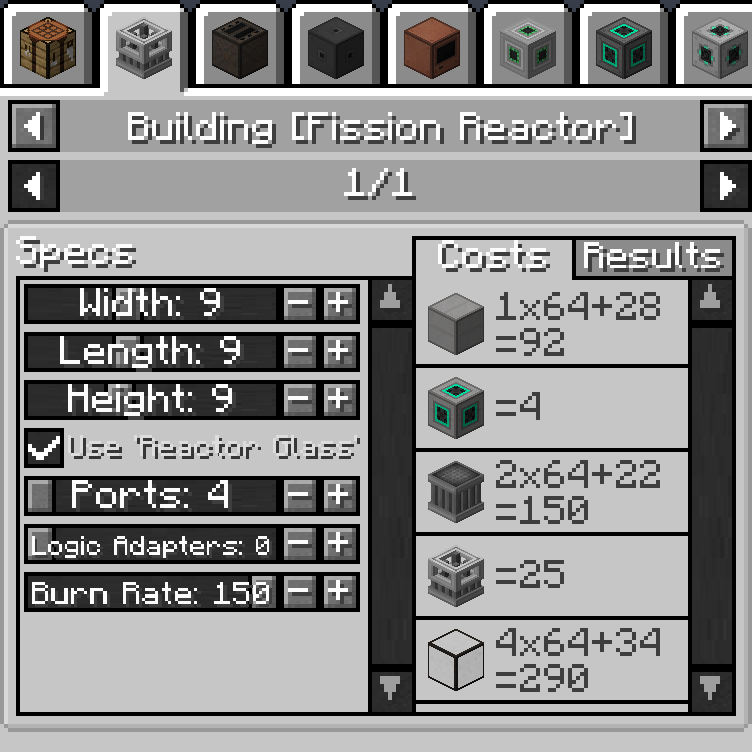
The Fission Reactor calculator includes dimensions from 3x3x4 to 18x18x18, a Reactor Glass toggle, port and logic adapter count sliders, and a burn rate slider. The mod automatically calculates the number of Fission Fuel Assemblies and Control Rod Assemblies based on the inner dimensions. Fuel assemblies are arranged in a checkerboard pattern across the inner floor, and each column extends up through the inner height minus one. The maximum burn rate scales directly with the number of fuel assemblies.
The Results tab is particularly valuable here because it shows stable temperatures for both Water cooling and Sodium cooling at your selected burn rate. Temperature values are color-coded: green is safe, transitioning through orange to red as temperatures approach and exceed the 1,200 K damage threshold. At 1,800 K the indicator is fully red. If the temperature reads infinity, it means the reactor simply cannot be cooled at that burn rate. The tab also shows heating rates for both coolant types, plus tank capacities (100,000 mB coolant per volume block, 1,000,000 mB heated coolant per volume block, 8,000 mB fuel per fuel assembly).
Always check the stable temperature display before building a Fission Reactor at a given size and burn rate. If the temperature shows red or infinity, your reactor will overheat and cause a meltdown. Use this calculator to find the safe maximum burn rate for your reactor dimensions and coolant type before committing resources to construction.
Fusion Reactor
The Fusion Reactor has completely fixed 5x5x5 dimensions with 36 corner blocks and 28 side blocks. Its configurable options include a Reactor Glass toggle, a Water Cooled checkbox, port and logic adapter count sliders, and an injection rate slider (even numbers from 2 to 1,000). When Water Cooled is enabled, the minimum port count increases from 2 to 4, and the injection rate is capped at 98 for steam production calculations. The Results tab shows passive energy generation, fuel tank capacity (fixed 1,000 mB), and energy storage capacity (fixed 1 GFE). In water cooled mode, it additionally displays steam production rate, water tank capacity (1,000,000 mB times the limited injection rate), and steam tank capacity (100x the water tank).
Multiblock Dimension Ranges
| Dynamic Tank | Evaporation Plant | Boiler | SPS | Induction Matrix | Turbine | Fission Reactor | Fusion Reactor | |
|---|---|---|---|---|---|---|---|---|
| Width | 3–18 | 4 | 3–18 | 7 | 3–18 | 5–17 (odd) | 3–18 | 5 |
| Length | 3–18 | 4 | 3–18 | 7 | 3–18 | = Width | 3–18 | 5 |
| Height | 3–18 | 3–18 | 4–18 | 7 | 3–18 | 5–18 | 4–18 | 5 |
| Fixed Size | No | Partial | No | Yes | No | No | No | Yes |
Addon Mod Support
Beyond the eight core Mekanism multiblocks, JEMM also supports multiblocks from several Mekanism addon mods. If these mods are installed, their calculator pages appear automatically in JEI.
Better Fusion Reactor for Mekanism PLUS adds an enhanced Fusion Reactor with its own JEI page. Mekanism Extras adds pages for the Reinforced Induction Matrix and Naquadah Reactor. Evolved Mekanism adds pages for the Antimatter Protomolecular Transmutator and additional Induction Matrix element blocks. Each addon page follows the same interface pattern with dimension sliders, configuration checkboxes, and Costs/Results tabs.
Configuration
The mod provides a client-side configuration file where you can toggle the visibility of each multiblock's JEI page independently. All eight pages are enabled by default. The config is organized into two sections: "mekanism" for the five base Mekanism multiblocks (Dynamic Tank, Thermal Evaporation Plant, Thermoelectric Boiler, SPS, Induction Matrix) and "mekanismgenerators" for the three generator multiblocks (Industrial Turbine, Fission Reactor, Fusion Reactor). Each multiblock has a single "visible" boolean that controls whether its JEI page appears. This is useful if you only use certain multiblocks and want to reduce clutter in JEI's category list.
FAQ
Does this mod add any blocks or items to the game?
No. Just Enough Mekanism Multiblocks is purely an informational addon. It adds JEI recipe category pages that calculate multiblock costs and performance stats. It does not add any new blocks, items, or gameplay mechanics.
Why don't I see the Turbine, Fission Reactor, or Fusion Reactor pages?
These three pages require Mekanism Generators to be installed alongside base Mekanism. The mod checks for Mekanism Generators at startup, and only registers those categories if the dependency is present. Make sure Mekanism Generators is in your mods folder.
What do the orange and red highlighted values mean?
Orange values indicate a performance bottleneck. For example, an orange Turbine Vent count means the flow rate is being limited by insufficient vents, or an orange Superheating Element count means the boil rate could be higher with more elements. Red values on the Fission Reactor temperature indicate dangerous overheating that will damage the reactor. Hover over any highlighted value to see a detailed tooltip.
Can I disable specific multiblock pages I don't use?
Yes. The mod has a client-side config file where each of the eight multiblock pages has an independent "visible" toggle. Set any page to false to hide it from JEI. The config is organized under "multiblocks > mekanism" and "multiblocks > mekanismgenerators" sections.
Why does the Industrial Turbine only allow odd-numbered widths?
The Turbine requires a center column for the rotor assembly and Rotational Complex, which means the inner width must be odd so there is a single center block. The mod enforces this by using a special slider that only stops on odd values (5, 7, 9, 11, 13, 15, 17). The length is always locked to match the width since the Turbine must have a square footprint.
Does this mod work with Fabric or NeoForge?
The mod is available for multiple mod loaders. Check the CurseForge page for available versions matching your Minecraft version and mod loader. The core functionality is the same across all supported platforms.