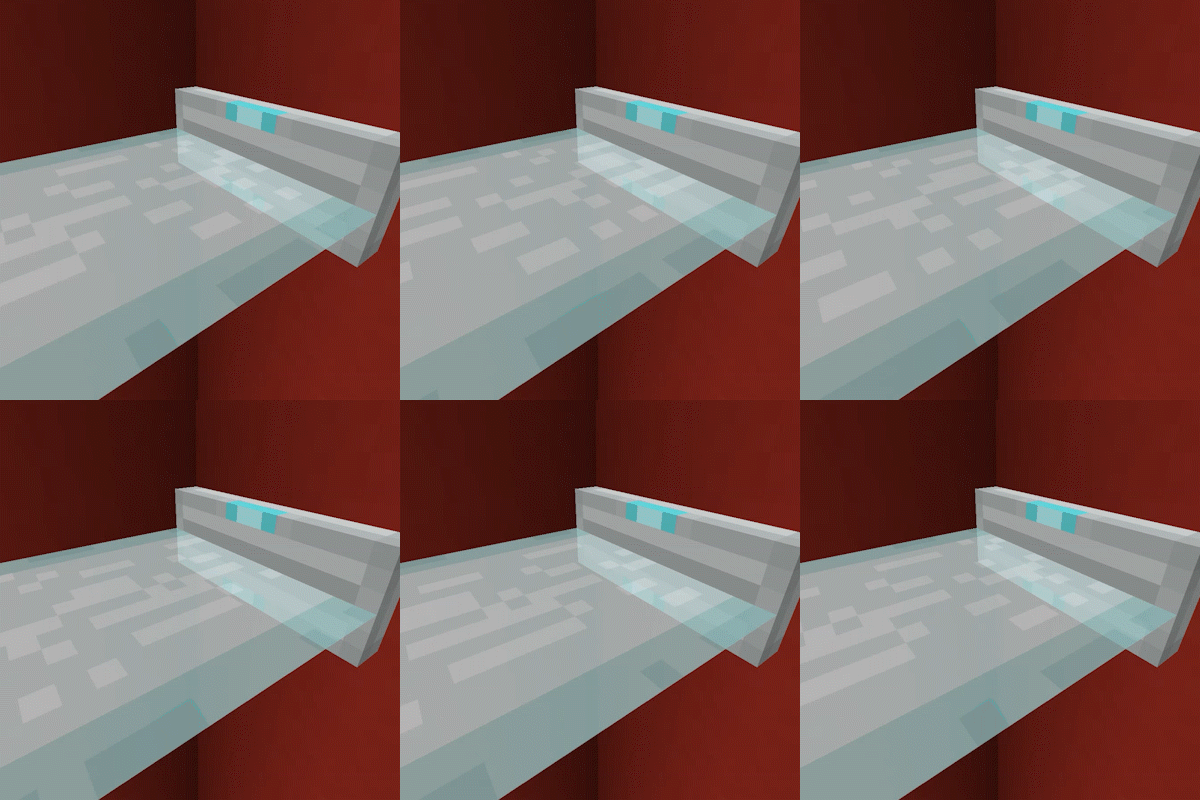
Laser Bridges & Doors Mod Guide: Redstone-Powered Laser Platforms & Fences
Laser Bridges & Doors adds futuristic laser platforms and fences to Minecraft, activated by Redstone signals. Place a Laser Source Block, power it, and watch a colorful laser bridge extend outward. The bridge length scales dynamically with signal strength, and all 16 dye colors are supported.
Overview
Laser Bridges & Doors is a compact Redstone utility mod that adds two new source blocks to Minecraft: the Laser Source Block and the Laser Fence Source Block. When powered by a Redstone signal, these blocks project a beam of laser light that forms a solid, walkable platform (bridge mode) or a vertical barrier (fence mode). The length of the laser beam scales directly with Redstone signal strength, giving you precise control over how far the bridge or fence extends.
Every laser can be dyed any of Minecraft's 16 standard colors by right-clicking the source block with a Dye, making these perfect for color-coded security doors, retractable walkways, or decorative lighting. The laser blocks themselves emit a light level of 10 and are completely indestructible once projected, so they double as reliable light sources and impenetrable barriers. You can browse the mod's items using the tabs on this page.
Getting Started
- 1
Gather Materials
You will need 7 Iron Ingots, 1 Glass Block, and 1 End Crystal. The End Crystal is the most expensive ingredient, requiring 7 Glass, 1 Eye of Ender, and 1 Ghast Tear. Plan a trip to the Nether to obtain the Ghast Tear and Blaze Powder (for the Eye of Ender) before you can craft your first Laser Source Block.
- 2
Craft Your First Laser Source Block
Place the End Crystal in the center of the Crafting Table, surround it with 7 Iron Ingots on all sides except one corner, and place the Glass Block in the remaining slot. This produces a Laser Source Block, which projects flat laser platforms when powered.
- 3
Place and Power the Source Block
Laser Source Blocks can be placed on floors, walls, or ceilings, and they face in the direction you place them. The laser beam projects outward from the front face. Apply a Redstone signal (Lever, Button, Redstone Torch, or any Redstone circuit) to activate the beam. The stronger the signal, the longer the bridge.
- 4
Customize the Color
Right-click any Laser Source Block with a Dye to change the laser color. All 16 Dye colors are supported. You can also use a Dispenser facing the source block to apply Dye automatically, which is useful for Redstone contraptions that cycle colors.
- 5
Try Fence Mode
Place a Laser Source Block alone in a Crafting Table to convert it into a Laser Fence Source Block (and vice versa). Laser Fences project a thin vertical wall instead of a flat platform, making them ideal for doors and barriers that block player and mob movement.
The End Crystal recipe requires a Ghast Tear and an Eye of Ender, so you will need access to the Nether before you can craft Laser Source Blocks. This is not an early-game item.
Laser Bridge vs. Laser Fence
The mod adds two types of laser source blocks, each producing a different beam shape. The Laser Source Block projects a flat, horizontal (or vertical, depending on placement) platform that players and mobs can walk across. Think of it as a retractable bridge or floor panel. The Laser Fence Source Block, on the other hand, projects a thin vertical wall that blocks movement but does not provide a walkable surface. This is perfect for doors, security barriers, and mob-proof gateways.
Both types share the same core mechanics: they respond to Redstone signal strength, support all 16 dye colors, and can be mounted on any surface. Converting between the two is free and instant; just place one in a Crafting Table to get the other. This means you only need to craft the base Laser Source Block and can switch forms as needed.
Placement Orientation
Laser Source Blocks behave like Buttons and Levers when it comes to placement. They can be mounted on floors, walls, or ceilings, and they orient based on which surface you click and the direction you face when placing them. A source block on the floor projects the laser horizontally in the direction you were looking. A source block on a wall projects the laser upward or downward. A source block on the ceiling projects the laser downward. Experiment with placement to get the exact angle you need for your build.
Redstone Signal Strength and Laser Length
The length of a laser beam is directly proportional to the Redstone signal strength powering the source block. At the default max length setting of 15, a signal strength of 15 (for example, from a Lever directly on the block) produces a 15-block-long laser. A signal strength of 8 produces an 8-block laser, and a signal of 1 produces a single-block laser. The formula is straightforward: beam length equals (max_length / 15) multiplied by the signal power, rounded down.
This proportional scaling opens up some creative possibilities. By using a Redstone Comparator reading from a container with a specific number of items, you can create bridges that extend to precise lengths. You can also use a Daylight Sensor to create a bridge that grows and shrinks throughout the day. When the Redstone signal is removed entirely, the laser retracts and all projected laser blocks disappear.
Laser Block Properties
| Max Beam Length (default) | 15 blocks |
| Light Level (active) | 10 |
| Source Block Hardness | 0.8 |
| Laser Block Hardness | Indestructible (-1.0) |
| Laser Block Blast Resistance | 3,600,000 |
| Color Range | 16 dye colors (0-15) |
| Sound Range | 75.0 blocks |
Use a Repeater chain or Comparator to fine-tune signal strength and create bridges of exact lengths. A Comparator reading from a Barrel with a specific fill level gives you granular control without complex wiring.
Coloring Your Lasers
Every Laser Source Block starts with a default color (white). To change it, simply right-click the source block while holding any Dye. The color applies to both the source block and all of its projected laser blocks instantly. If the laser is currently active, the entire beam updates to the new color in place. One Dye item is consumed per color change.
Dispensers can also apply Dye to Laser Source Blocks and Laser Fence Source Blocks. Point a Dispenser at a source block, load it with the desired Dye, and pulse it with Redstone. This makes it possible to build automated color-cycling systems or use different colored lasers as visual indicators in Redstone circuits. For example, you could wire a green laser to indicate "safe" and a red laser to indicate "danger" using a simple Redstone toggle.
Practical Build Ideas
Retractable Bridges
The most straightforward use case. Place a Laser Source Block at the edge of a gap and power it with a Lever or Button. When activated, a solid bridge extends across the gap. When deactivated, the bridge disappears and the gap becomes impassable again. This is especially useful for base defense: mobs cannot cross the gap when the bridge is retracted, and you can toggle it from safety.
Security Doors
Use a Laser Fence Source Block mounted on a wall beside a doorway. When powered, the laser fence fills the opening with an indestructible barrier. Wire it to a Button or Pressure Plate for a door that opens when approached and closes automatically. Because the laser fence blocks have a blast resistance of 3,600,000, they cannot be destroyed by TNT or Creeper explosions.
Mob Traps and Farms
Retractable laser bridges make excellent trap floors. Build a walkway over a drop using laser bridges, lure mobs onto it, then cut the Redstone signal. The bridge vanishes instantly and mobs fall to their doom. The indestructible nature of laser blocks also means you can create barriers that mobs cannot break through, even on Hard difficulty.
Decorative Lighting
With a light level of 10, active laser blocks provide meaningful illumination. Colored laser beams can serve as ambient lighting for futuristic builds, sci-fi corridors, or nightclub-style rooms. Combine multiple source blocks with different dye colors for a multicolored display.
Projected laser blocks cannot be mined or blown up. The only way to remove them is to cut the Redstone signal to the source block, break the source block itself, or remove the block the source is attached to. If you accidentally create a laser in the wrong place, target the source block, not the beam.
Configuration
The mod's configuration file is located at config/laserbridges.json in your Minecraft profile folder. On Fabric, you can adjust settings in-game if you have Mod Menu installed. There are two configurable options.
max_length controls the maximum number of blocks a fully powered laser can extend. The default is 15. All other signal strengths scale proportionally from this value. Increasing it to 30, for example, means a signal strength of 15 produces a 30-block laser, while a signal strength of 8 produces a 16-block laser.
blocks_cut_through_by_lasers is a list of block IDs that lasers will replace as they project. By default, this includes Air, Cave Air, Void Air, Short Grass, Tall Grass, Fern, Large Fern, and Dead Bush. You can add other block IDs (like minecraft:snow or minecraft:vine) to allow lasers to cut through additional vegetation or obstacles.
Frequently Asked Questions
Can mobs walk on laser bridges?
Yes. Projected laser bridge blocks are fully solid and walkable by both players and mobs. Laser fence blocks, however, are thin vertical walls that block movement but cannot be walked on.
Can I break or mine the laser beam blocks?
No. Projected laser blocks have a hardness of -1.0 and a blast resistance of 3,600,000, making them completely indestructible. To remove them, you must either cut the Redstone signal to the source block, break the source block itself, or remove the surface the source is attached to.
Why is my laser shorter than expected?
Laser length is proportional to Redstone signal strength. A Lever directly on the source block gives signal 15 (full length), but Redstone Dust loses one level of signal per block of distance. Make sure your signal strength at the source block matches the length you need. Also check for solid blocks in the beam's path, as any block not in the pass-through list will stop the laser.
Does the laser pass through Glass or Water?
By default, no. The laser only passes through Air, Short Grass, Tall Grass, Ferns, Large Ferns, and Dead Bushes. Glass, Water, and all other blocks will stop the beam. You can add additional block IDs to the blocks_cut_through_by_lasers config list if you want lasers to pass through other blocks.
How do I convert between Bridge and Fence modes?
Place a Laser Source Block alone in a Crafting Table to get a Laser Fence Source Block, and vice versa. The conversion is free and works in both directions, so you never need to craft additional materials.
Does the mod work with Forge, Fabric, and NeoForge?
Yes. Laser Bridges & Doors supports all three mod loaders. On Fabric, you will need Mod Menu installed if you want to adjust the configuration in-game rather than editing the JSON file directly.