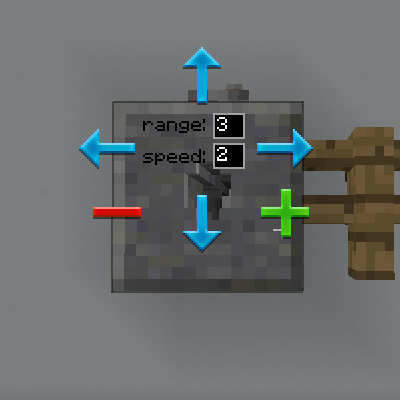
Multi-Piston Mod Guide: Directional Block Moving Made Easy
Multi-Piston adds a single powerful block to Minecraft that can pull blocks from one direction and push them out in any other direction. With configurable range, speed, and full redstone compatibility, it opens up creative possibilities for bridges, doors, elevators, and hidden passageways that vanilla Pistons simply can't achieve.
Overview
Multi-Piston is a focused utility mod from the LDT team (the creators of MineColonies and Structurize) that adds a single block: the Multi-Piston. Unlike vanilla Pistons, which can only push blocks in the direction they face, the Multi-Piston lets you define separate input and output directions. This means you can pull a block from the north and push it out to the east, or suck blocks from below and spit them upward. You can browse the crafting recipe on the Recipes tab above.
The block supports a configurable range of up to 10 blocks and three speed settings, all controlled through a simple GUI. It responds to Redstone signals just like a vanilla Piston, making it fully compatible with your existing Redstone contraptions. Whether you want to build retractable bridges, hidden doorways, compact elevators, or moving walls, the Multi-Piston handles it with a single block placement.
Getting Started
- 1
Craft Your First Multi-Piston
You'll need 3 Stone, 2 Redstone Blocks, and 3 Pistons. Place the 3 Stone across the top row, 2 Redstone Blocks in the middle-left and middle-center slots, and 3 Pistons across the bottom row. The recipe is moderately expensive since each Redstone Block requires 9 Redstone Dust.
- 2
Place and Open the GUI
Place the Multi-Piston block where you want it and right-click to open the configuration GUI. You'll see six directional buttons (up, down, left, right, forward, backward) along with fields for range and speed.
- 3
Set the Input Direction (Green)
Left-click one of the directional buttons to set the input (pull) direction, shown in green. This is the direction the Multi-Piston will pull blocks from when it receives a Redstone signal.
- 4
Set the Output Direction (Red)
Right-click a directional button to set the output (push) direction, shown in red. This is where blocks will be pushed when the Redstone signal turns off. The input and output can be any combination of the six directions.
- 5
Configure Range and Speed, Then Activate
Set the range (1 to 10 blocks) and speed (1 to 3) in the text fields, then click Confirm. Attach a Lever, Button, or Redstone signal to the Multi-Piston. When powered, it pushes blocks in the output direction; when the signal stops, it pulls them back via the input direction.
Multi-Piston Recipe


Each Multi-Piston requires 2 Redstone Blocks (18 Redstone Dust total) plus 3 Pistons. Make sure you have a healthy Redstone supply before mass-producing these blocks for large builds.
How the Multi-Piston Works
The Multi-Piston operates on a simple two-phase cycle controlled by Redstone. When powered, it moves blocks along the output direction. When the signal is removed, it moves blocks along the input direction. Each activation moves blocks one position per tick interval, continuing until the configured range is reached.
Direction Configuration
The GUI provides six directional options: Up, Down, North (forward), South (backward), East (right), and West (left). The input direction appears as a green highlight and the output direction as red. You can set any combination of directions, including the same axis (e.g., pull from the north, push to the south) or perpendicular directions (e.g., pull from below, push to the east). This flexibility is what sets the Multi-Piston apart from vanilla Pistons.
Range
Range controls how many blocks the Multi-Piston will move in a single activation cycle. The default range is 3 and the maximum is 10. The Multi-Piston will stop early if it encounters an unmovable block (like Bedrock or Obsidian) or reaches the end of available blocks to push.
Speed
Speed ranges from 1 (slowest) to 3 (fastest), with a default of 2. Internally, the block moves one step every 20 divided by the speed value in ticks. At speed 1, this means one move every 20 ticks (1 second). At speed 2, one move every 10 ticks (0.5 seconds). At speed 3, one move roughly every 6-7 ticks (about 0.33 seconds). Higher speeds look smoother for builds like bridges and elevators.
Multi-Piston Block Stats
| Hardness | 1.0 |
| Blast Resistance | 1.0 |
| Default Range | 3 blocks |
| Max Range | 10 blocks |
| Speed Options | 1 (slow), 2 (default), 3 (fast) |
| Min Speed Interval | ~7 ticks (speed 3) |
| Max Speed Interval | 20 ticks (speed 1) |
| Redstone Compatible | Yes |
The Multi-Piston cannot move Bedrock, Obsidian, or any block with a push reaction of IGNORE, DESTROY, or BLOCK (this includes most tile entities like Chests, Furnaces, and Hoppers). The one exception is blocks from the Domum Ornamentum mod, which are specifically whitelisted. If the first block in the path is unmovable, the Multi-Piston simply skips that tick and increments its progress counter.
Practical Build Ideas
Retractable Bridges
Place a Multi-Piston at one end of a gap with the input direction pointing toward your bridge blocks and the output direction pointing across the gap. Set the range to match the gap width (up to 10 blocks). When you flip a Lever, the bridge extends; flip it again and it retracts. Speed 3 gives the smoothest bridge animation.
Hidden Doors and Walls
Because the Multi-Piston can pull blocks in one direction and push them in a completely different one, you can create hidden passages that slide walls sideways or vertically. Set the input to pull from the wall's resting position and the output to push it into a cavity. Pair with a hidden Button or Pressure Plate for a secret entrance.
Block Elevators
Set the input direction to Down and the output to Up (or vice versa) to create a vertical block elevator. The Multi-Piston will push entities out of the way as it moves blocks, so players standing on the platform will be relocated safely. Note that this pushes entities to an adjacent position rather than riding them smoothly, so it works best for moving platforms rather than smooth player elevators.
Redstone Integration
The Multi-Piston responds to Redstone signals identically to vanilla Pistons. It works with Levers, Buttons, Pressure Plates, Redstone Dust, Repeaters, Comparators, and any other Redstone power source. When the block receives a signal, it begins pushing blocks in the output direction. When the signal is removed, it reverses and moves blocks in the input direction.
One important detail: the Multi-Piston only starts a new cycle when the Redstone signal changes and the previous cycle has completed (progress equals range). If you pulse the signal too quickly before a cycle finishes, the new input will be ignored. Make sure each activation has time to complete before toggling again, especially at speed 1 with a high range setting.
At speed 2 (default) with range 5, a full cycle takes about 2.5 seconds. Use a Repeater chain with appropriate delays if you need precise automated timing. A Lever is the simplest activation method for manual use since it stays in the on/off state.
Entity Handling
When the Multi-Piston moves a block into a position where an entity (player, mob, or item) is standing, it pushes that entity one block in the direction of movement. This prevents entities from being trapped inside blocks but also means players won't smoothly ride on moving platforms. Entities are teleported to the center of the next block position (offset by 0.5 on each axis), so the movement feels instantaneous rather than gradual.
Frequently Asked Questions
How do I open the Multi-Piston GUI?
Right-click the Multi-Piston block to open its configuration GUI. From there, left-click a direction button to set the input (green) and right-click a direction button to set the output (red). Enter your desired range and speed values, then click Confirm.
Can the Multi-Piston move Chests, Furnaces, or other tile entities?
No. Most tile entities (blocks with inventories or special data like Chests, Furnaces, Hoppers, and Brewing Stands) have a BLOCK push reaction and cannot be moved. The only exception is blocks from the Domum Ornamentum mod, which are specifically whitelisted in the code.
Does the Multi-Piston work with Redstone?
Yes, it works with Levers, Buttons, Pressure Plates, and any Redstone power source. When powered, it pushes blocks in the output direction. When the signal is removed, it moves blocks in the input direction.
Why is my Multi-Piston not moving blocks?
Check three things: First, make sure a previous cycle has completed before toggling the Redstone signal again. Second, verify that the blocks you're trying to move are not unmovable types (Bedrock, Obsidian, tile entities). Third, ensure there's empty space or air at the destination for the blocks to move into. The Multi-Piston requires the destination position to be air or a fluid block.
Can I increase the range beyond 10 blocks?
No. The maximum range is hard-capped at 10 blocks in the source code. Even if you type a higher number in the GUI, it will be clamped to 10. For longer distances, you can chain multiple Multi-Pistons together.
Does the Multi-Piston work with Structurize or MineColonies?
The Multi-Piston is made by the same team (LDT) and uses BlockUI from Structurize for its GUI. It also explicitly supports Domum Ornamentum blocks (another LDT mod), allowing those decorative blocks to be moved by the Multi-Piston even though they are technically tile entities. Other LDT mod blocks follow standard Minecraft push rules.