Repurposed Structures Mod Guide: Every Biome Variant Structure Across All Dimensions
Repurposed Structures transforms Minecraft's world generation by adding over 60 biome-themed variants of vanilla structures across all three dimensions. From Jungle Fortresses and Nether Villages to Ocean Dungeons and End Shipwrecks, every biome now has structures that feel like they belong there. The mod is entirely server-side, meaning vanilla clients can connect without installing anything.
Overview
Repurposed Structures takes vanilla Minecraft's existing structures and reimagines them for every biome and dimension. Instead of finding the same Oak Mineshaft everywhere underground, you'll discover Birch Mineshafts in Birch Forests, Desert Mineshafts made of Sandstone beneath deserts, and even Nether Mineshafts built from Nether Bricks deep in the lava-filled caverns of the Nether. The mod adds over 60 structure variants spanning Mineshafts, Villages, Outposts, Temples, Dungeons, Strongholds, Shipwrecks, Pyramids, Igloos, Wells, and more.
The beauty of this mod is that it doesn't add any new blocks or items. Every structure is built entirely from vanilla blocks, themed to match the biome it generates in. This means the mod works as a pure server-side installation, so vanilla clients can connect to servers running Repurposed Structures without needing to install it themselves. Everything is fully configurable through either the in-game config menu (via Mod Menu) or datapacks for 1.18.2 and newer versions.
Getting Started
- 1
Install and Generate a New World
After installing Repurposed Structures, create a new world or explore ungenerated chunks in an existing world. The mod only affects newly generated terrain, so previously explored areas won't gain new structures. All structures are enabled by default with balanced spawn rates.
- 2
Explore Your Local Biome
Start by mining underground in whatever biome you spawned in. You'll immediately notice that Mineshafts now match the biome. Birch Forests have Birch Mineshafts, Jungles have vine-covered Jungle Mineshafts, and Deserts have Sandstone Mineshafts. Each variant uses materials native to its biome, making exploration feel much more immersive.
- 3
Check for New Villages
Travel to biomes that don't normally have Villages in vanilla, like Dark Forests, Jungles, Swamps, Birch Forests, Mountains, and Badlands. You'll find fully functional Villages with Villagers, job site blocks, and loot chests, all built from biome-appropriate materials. Nether Villages can even be found in Crimson and Warped Forests.
- 4
Venture Into the Nether
The Nether receives a massive content boost. Each Nether biome now has its own themed Temple (Wasteland, Basalt, Crimson, Warped, and Soul variants), plus Nether Outposts, Nether Shipwrecks, Nether Pyramids, Nether Dungeons, Nether Wells, Nether Mineshafts, and even a Nether Stronghold. There's an enormous amount of exploration content to discover.
- 5
Customize Your Experience
If you want to adjust which structures spawn or how often, install Mod Menu to access the in-game configuration screen. You can toggle individual structures on and off, change spawn rates, adjust height ranges, and blacklist specific biomes. For version 1.18.2 and newer, configuration is handled through datapacks instead.
Overworld Structures
Biome-Themed Mineshafts
Repurposed Structures replaces vanilla Mineshafts in most Overworld biomes with themed variants. In Birch Forests, the support beams and planks are made from Birch Wood. Desert Mineshafts use Sandstone and have a dry, sandy appearance. Jungle Mineshafts are overgrown with Vines and use Jungle Wood. Icy Mineshafts appear in snowy and frozen biomes with Packed Ice elements, while Ocean Mineshafts generate at lower heights (max Y 25 by default) beneath ocean floors. Savanna, Stone (for Mountain biomes), Swamp/Dark Forest, and Taiga variants round out the collection, each using appropriate local materials.
All Overworld Mineshaft variants generate between Y 8 and Y 45 by default, with a spawn rate of 40 (configurable from 0 to 1000). Setting any variant's spawn rate to 0 will cause vanilla Mineshafts to generate again in that biome. Each Mineshaft can contain loot chests, which can be toggled off in the config.
New Villages
The mod adds Villages to 9 Overworld biomes that vanilla Minecraft leaves empty. Badlands Villages use Red Sandstone and Terracotta with a max chunk distance of 23, making them among the more common variants. Birch, Dark Forest, Swamp, Mountains, and Oak Villages all share a max chunk distance of 31. Jungle Villages appear with a spacing of 29 chunks, and Giant Taiga Villages have a spacing of 29 chunks as well. All these Villages function exactly like vanilla ones, with Villagers, Iron Golems, job site blocks, and loot.
Swamp Villages are particularly atmospheric, generating slightly sunken (with a vertical offset of -1) and featuring vine decorations that grow naturally on the structures. Jungle Villages similarly receive vine decorations during generation.
Pillager Outposts
Seven new Overworld Outpost variants appear in biomes that didn't previously have them. Birch, Jungle, Desert, and Snowy Outposts all have a max chunk distance of 39, while Giant Tree Taiga and Icy Outposts are slightly more common at 37 chunks. Badlands Outposts are the most frequent at 31 chunks. Each Outpost spawns Pillagers just like vanilla, and they're kept away from Overworld Villages to prevent constant raids.
Since Repurposed Structures adds no new blocks or items, it works entirely server-side. Server operators can install it without requiring players to have the mod installed on their clients. This makes it one of the easiest mods to add to any server.
Igloos, Pyramids, and Other Structures
Grassy Igloos spawn in Plains and Forest biomes with a max chunk distance of 20. Instead of Snow Blocks, these use Grass and Dirt, blending seamlessly into temperate landscapes. They share the same underground basement design as vanilla Igloos. Stone Igloos appear in Giant Tree Taiga biomes, also with a spacing of 20 chunks, built from Stone and Cobblestone.
Badlands Pyramids are a new Desert Temple variant that generates in non-plateau Badlands biomes with a max chunk distance of 20, built from Red Sandstone and Terracotta. They contain the same trap and treasure room design as vanilla Desert Temples but with biome-appropriate materials.
Jungle Fortress
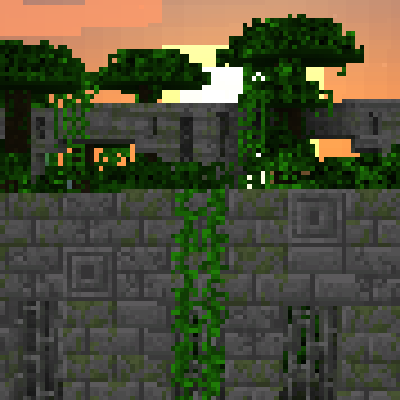
One of the mod's signature additions is the Jungle Fortress, a Nether Fortress reimagined for Jungle biomes. It generates with a max chunk distance of 32 and uses Mossy Stone Bricks and regular Stone Bricks. The fortress features natural breakage (holes and crumbling sections) to give it an ancient, overgrown appearance, and Vines grow throughout the corridors. By default, 0.5% of the Stone Bricks are replaced with Silverfish Blocks, and loot chests spawn inside.
Stonebrick Stronghold
The mod replaces vanilla Strongholds with a much larger Stonebrick Stronghold variant. The default size is 100% of the new design, which is considerably bigger than vanilla (set it to 60% to approximate vanilla size). The Stronghold generates between Y 0 and Y 45 with a max chunk distance of 85. Decorative Chains with attached Lanterns spawn throughout the corridors at a configurable rate (default 35). About 0.8% of Stone Bricks are replaced with Silverfish Blocks, and the Stronghold features extra Mob Spawners in rooms beyond the Portal Room.
The Repurposed Structures Stonebrick Stronghold is significantly larger than vanilla Strongholds. If you find it too overwhelming, reduce the strongholdSizeSH config value to 60 for something closer to vanilla size. The setting ranges from 10 (tiny) to 2000 (massive).
Wells and Boulders
Five Well variants generate across different biomes. Badlands Wells use Red Sandstone, Snow Wells are built from Snow and Ice, Forest Wells use Wood and Cobblestone, Mossy Stone Wells appear in Jungles, Dark Forests, and Swamps, and Nether Wells generate between Y 30 and Y 91 in the Nether. All Wells have a 1 in 350 chance of generating per chunk by default, and each can optionally contain a Bell.
Giant Boulders replace the small boulders in Giant Tree/Spruce Taiga Hills biomes. These massive rock formations can contain Coal Ore, Iron Ore, and extremely rarely Diamond Ore (1 in 7000 chance per block placement by default). They spawn at a rate of 0.5 per chunk. Tiny Boulders also appear in normal and Snowy Taiga Mountains biomes.
Horned Swamp Tree
A unique tree variant called the Horned Swamp Tree generates in Swamp biomes. These are larger than normal Swamp Trees with a distinctive branching shape. They spawn uncommonly in regular Swamp biomes and replace all vanilla trees in Swamp Hills, giving those biomes a much more dramatic canopy.
End Ruined Portal
An End-themed Ruined Portal variant generates in End biomes with a max chunk distance of 57. These crumbling portal frames use End Stone Bricks and Purpur materials, providing an eerie reminder of interdimensional travel attempts in the void.
Nether Structures
The Nether receives the largest content injection from Repurposed Structures. Every Nether biome now has multiple unique structures to discover, transforming the Nether from a dimension with just Fortresses and Bastions into a structure-rich exploration experience.
Nether Temples
Five Nether Temple variants cover every Nether biome. Wasteland Temples appear in Nether Wastes, Basalt Temples in Basalt Deltas, Crimson Temples in Crimson Forests, Warped Temples in Warped Forests, and Soul Temples in Soul Sand Valleys. All share a max chunk distance of 27 and are built from materials matching their biome (Nether Bricks, Basalt, Crimson/Warped materials, and Soul Sand/Soil respectively). Each Temple contains loot and traps reminiscent of Desert Temples but with Nether-themed twists.
Nether Villages
Crimson and Warped Villages generate in their respective forest biomes with a max chunk distance of 30. These Villages use Crimson and Warped wood materials and have functional Villager infrastructure. Finding a Nether Village provides a safe haven and trading opportunity in an otherwise hostile dimension.
Nether Outposts, Shipwrecks, and More
Nether Brick Outposts appear in non-warped, non-crimson Nether biomes with a spacing of 34 chunks. Crimson and Warped Outposts generate in their respective forests, also at 34 chunks. These function like Overworld Pillager Outposts with hostile mobs and loot.
Nether Bricks Shipwrecks spawn in general Nether biomes at 51 chunk spacing, while Crimson and Warped Shipwrecks appear in their matching forests at 41 chunk spacing. The Nether Pyramid is a massive structure appearing at 37 chunk spacing, and Nether Dungeons generate throughout at 8 attempts per chunk. The Nether also receives its own Mineshaft variant that generates between Y 8 and Y 13, and a Nether Stronghold with a max chunk distance of 85 that generates between Y 33 and Y 36.
Eyes of Ender actually work in the Nether to locate Nether Strongholds. This gives the End Portal item a dual purpose and provides a reliable way to find these deeply hidden structures. Nether Strongholds feature Chains with Soul Lanterns at a configurable spawn rate (default 50).
End Structures
The End dimension, often barren after defeating the Ender Dragon, gains three new structure types. End Mineshafts generate between Y 30 and Y 37 with a spawn rate of 60 (higher than Overworld variants), using End Stone Bricks and Purpur blocks. By default they only appear in End Highlands and Mid areas, but you can enable them in End Barrens and End Islands through the config.
End Shipwrecks appear in End Highlands with a max chunk distance of just 15, making them relatively common. These floating wrecks are built from Purpur and End Stone, offering loot in a dimension that previously had little to explore beyond End Cities. End Dungeons generate at 8 attempts per chunk outside the Ender Dragon island, and End Ruined Portals appear at 57 chunk spacing throughout End biomes.
Biome-Themed Dungeons
Ten Dungeon variants replace vanilla Monster Spawner rooms across every biome category. Badlands, Dark Forest, Desert, Jungle, Mushroom, Snow, and Swamp Dungeons all replace the vanilla Dungeon in their respective biomes, generating at 8 attempts per chunk between Y 2 and Y 255. Each uses biome-appropriate block palettes for the walls and floor.
Ocean Dungeons are unique because they don't replace vanilla Dungeons; they spawn in addition to them. They appear on the ocean floor and in underwater caves and ravines at 6 attempts per chunk. End and Nether Dungeons bring this classic structure type to dimensions that never had them, making underground exploration in those dimensions much more interesting.
Structure Spawn Rates by Dimension
| Overworld | Nether | End | |
|---|---|---|---|
| Mineshafts | 11 variants (rate: 40) | 1 variant (rate: 40) | 1 variant (rate: 60) |
| Villages | 9 variants (dist: 23-33) | 2 variants (dist: 30) | None |
| Outposts | 7 variants (dist: 31-39) | 3 variants (dist: 34) | None |
| Dungeons | 7 variants (8/chunk) | 1 variant (8/chunk) | 1 variant (8/chunk) |
| Wells | 4 variants (1/350) | 1 variant (1/350) | None |
| Stronghold | Stonebrick (dist: 85) | Nether (dist: 85) | None |
| Other | Igloos, Pyramid, Fortress | 5 Temples, Pyramid, 3 Shipwrecks | Shipwreck, Ruined Portal |
Configuration
Repurposed Structures offers extensive configuration options organized into nine categories: Dungeons, Main, Temples, Mineshafts, Strongholds, Outposts, Villages, Wells, and Shipwrecks. Install Mod Menu to access the in-game config screen, or edit the config files directly.
Key Config Options
Every structure has a MaxChunkDistance setting (1 for most chunks, 1001 for none) and a toggle for adding structures to modded biomes of the same type. Dungeons have per-variant settings for spawn attempts per chunk (0-1000), minimum Y height, and maximum Y height. Mineshafts have separate spawn rate, min height, and max height configurations per variant.
The Stronghold section is particularly important. You can adjust the overall size (10-2000%, default 100%), toggle extra Spawners and loot Chests, set Silverfish Block percentage (default 0.8%), and configure Chain spawn rates. The Nether Stronghold defaults to generating between Y 33 and Y 36, keeping it hidden in the lower Nether.
A global dimension blacklist lets you prevent all Repurposed Structures from generating in specific dimensions. By default, The Bumblezone dimension is blacklisted. You can also blacklist individual biomes per structure category to fine-tune generation.
Compatibility and Datapacks
Repurposed Structures is designed to be broadly compatible with other mods. It adds structures directly to biomes, so conflicts are extremely rare. The mod works alongside YUNG's Better Strongholds, YUNG's Better Mineshafts, and other structure-modifying mods; both sets of structures will generate. Special datapacks are available to restyle Repurposed Structures' buildings to match YUNG's aesthetic if desired.
Since structures use NBT files, template pools, and processors, you can create your own datapacks to override block palettes. This means you can customize any structure to use blocks from other mods, or add pieces of other mods' Villages into Repurposed Structures' Villages. Pre-made compatibility datapacks are available on the mod's GitHub wiki.
The mod also supports modded biomes automatically. Each structure category has a toggle (enabled by default) that adds its structures to modded biomes of the same type. If a modded biome is categorized as a jungle biome, it will receive Jungle Mineshafts, Jungle Outposts, Jungle Villages, and Jungle Dungeons.
Complete Structure Count
| Mineshaft Variants | 11 (Birch, Desert, End, Nether, Icy, Jungle, Ocean, Savanna, Stone, Swamp/Dark Forest, Taiga) |
| Village Variants | 11 (Badlands, Birch, Dark Forest, Jungle, Swamp, Mountains, Giant Taiga, Crimson, Warped, Oak) |
| Outpost Variants | 10 (Nether Brick, Warped, Crimson, Birch, Jungle, Giant Tree Taiga, Desert, Badlands, Snowy, Icy) |
| Dungeon Variants | 10 (Badlands, Dark Forest, Desert, End, Nether, Snow, Swamp, Mushroom, Jungle, Ocean) |
| Temple Variants | 5 (Wasteland, Basalt, Crimson, Warped, Soul) |
| Well Variants | 5 (Badlands, Nether, Snow, Mossy Stone, Forest) |
| Shipwreck Variants | 4 (End, Nether Bricks, Crimson, Warped) |
| Stronghold Variants | 2 (Stonebrick, Nether) |
| Pyramid Variants | 2 (Badlands, Nether) |
| Igloo Variants | 2 (Grassy, Stone) |
| Unique Structures | 3 (Jungle Fortress, End Ruined Portal, Horned Swamp Tree) |
| Total Structures | 65+ |
Frequently Asked Questions
Do I need to install this mod on the client?
No. Repurposed Structures is entirely server-side since it doesn't add any new blocks or items. Vanilla clients can connect to servers running this mod without installing anything. However, if you want to use the config screen, you'll need the mod installed alongside Mod Menu on the client.
Will structures appear in chunks I've already explored?
No. Like all world generation mods, Repurposed Structures only affects newly generated chunks. You'll need to explore new terrain or create a new world to find the new structures.
Does this mod work with YUNG's Better Strongholds and Better Mineshafts?
Yes. Both mods' structures will generate alongside each other. Repurposed Structures' variants remain in the vanilla style unless you apply special compatibility datapacks (available on the wiki) that restyle them to match YUNG's aesthetic. YUNG's Better Mineshafts already has biome variants, so both sets coexist.
How do I turn off specific structures?
On versions before 1.18.2, use Mod Menu to access the config screen and set the spawn rate or max chunk distance to 0 (for dungeons/mineshafts) or 1001 (for other structures). On 1.18.2 and newer, configuration is done through datapacks. Download the config datapack from the mod's GitHub wiki and edit it to disable specific structures.
What are the banners in loot chests?
Some structures have special banners as hidden collectibles in their loot chests, but they only appear if you have the Luck status effect or attribute. Since Luck isn't obtainable in vanilla Minecraft, you'll need another mod or datapack that grants Luck to find these Easter egg items.
How do I disable the advancement notifications?
Download the advancement-disabling datapack from the mod's GitHub wiki. Place the zipped folder into your world's datapack folder. You can also selectively keep advancements for structures you enjoy by deleting specific files from the datapack before adding it.