RFTools Mod Guide: RF-Powered Machines, Teleportation, Shields & Automation
RFTools is a massive technology mod that adds dozens of RF-powered machines for teleportation, building, shielding, storage management, mob spawning, and redstone logic. With systems ranging from simple coal generators to complex endergenic power and dimensional teleporters, RFTools provides essential infrastructure for any tech-oriented Minecraft world.
Overview
RFTools is one of the most comprehensive RF-based technology mods available for Minecraft 1.7.10 through 1.10.2. It adds a staggering number of machines and tools that all run on Redflux (RF) energy, covering nearly every aspect of base automation you could want. From teleporting across dimensions to quarrying entire mountains, from programmable screens that display your power levels to force fields that protect your base from explosions, RFTools has it all.
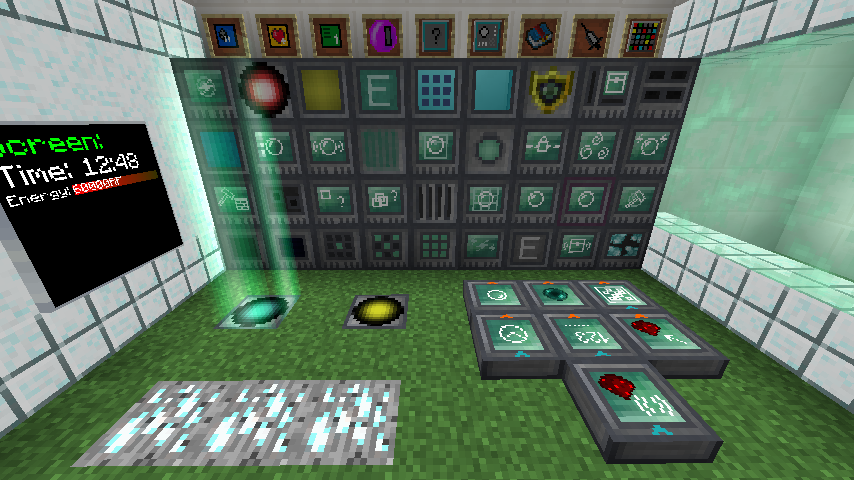
The mod is organized around several major systems: power generation, teleportation, building and quarrying, shields, screens, storage management, environmental effects, mob spawning, and redstone logic. Each system is self-contained but they all interconnect beautifully through shared power networks and the Smart Wrench. You can browse every item and recipe the mod adds using the tabs at the top of this page.
Note that on Minecraft 1.14 and later, RFTools has been split into multiple separate mods (RFTools Base, RFTools Utility, RFTools  Builder, RFTools Power, RFTools Storage, and RFTools Control). This guide covers the unified RFTools mod for 1.7.10 through 1.10.2. RFTools requires McJtyLib as a dependency.
Getting Started with RFTools
- 1
Craft a Machine Frame
Almost every RFTools machine requires a
 Machine Frame as the base crafting ingredient. This is the foundation block you will need in bulk. Craft several Machine Frames early on, as you will go through many of them as you expand your RFTools infrastructure.
 - 2
Build a Coal Generator
Your first power source should be the Coal Generator. It produces 60 RF/tick from Coal, with each piece lasting 600 ticks (30 seconds). It stores up to 500,000 RF and can output 2,000 RF/tick. This is enough to get your early machines running while you work toward more advanced power generation.
- 3
Craft a Smart Wrench
The Smart Wrench is your essential RFTools tool. It has two modes: wrench mode for picking up and rotating blocks (preserving all their data), and select mode for configuring connections between devices like the
 Dialing Device and teleporters. Sneak-right-click to toggle between modes.
 - 4
Set Up Your First Crafter
The Crafter 1 supports 2 simultaneous recipes and costs only 100 RF per operation. Place it down, pipe in RF power, and configure your recipes in the GUI. Each recipe slot has a 3x3 grid where you ghost-place items to define the crafting pattern. Items piped into the Crafter's inventory will be automatically crafted when they match a recipe.
- 5
Get Dimensional Shards
Dimensional Shards are the advanced crafting material for many higher-tier RFTools machines. They generate as ore between Y levels 2 and 40 in the Nether and End (by default). If RFTools Dimensions is not installed, they also spawn in those dimensions. You can also craft them if configured (hard recipe by default without RFTools Dimensions). Mine these early for access to advanced machines like shields and builders.
Many RFTools machines implement the Infusable interface, meaning they can be upgraded using the  Machine Infuser with Dimensional Shards. Infused machines have improved efficiency, reduced power consumption, and increased speed. Infusable machines include the Coal Generator, Crafter, Builder, Shield Projectors,
  Endergenic Generator, Environmental Controller,
  Elevator, Booster,
  Screen Controller,
  Remote Storage, and
  Block Protector. Always infuse your most important machines first.
Power Generation
Coal Generator
The Coal Generator is your entry-level power source. It generates 60 RF/tick from Coal or Charcoal, with each piece providing 600 ticks of burn time (36,000 RF per Coal). It has an internal buffer of 500,000 RF, can output 2,000 RF/tick to adjacent machines, and can charge items in its charge slot at 1,000 RF/tick. As an Infusable machine, upgrading it with Dimensional Shards via the Machine Infuser will improve its generation rate.
Endergenic Generator
The Endergenic Generator is the advanced power system in RFTools, generating massive amounts of RF from Ender Pearls. The setup requires an Endergenic Generator block, a  Pearl Injector to feed Ender Pearls into the system, and an Ender Monitor to track performance. The generator holds pearls in an energy field, consuming 500 RF/tick per held pearl, and outputs up to 20,000 RF/tick to adjacent blocks.
The trick to Endergenic power is timing. Pearls fired between multiple Endergenic Generators in sequence produce exponentially more power thanks to the 2.0x power generation multiplier. However, there is a 0.5% chance per tick that a held pearl is lost, so the system requires a steady supply of Ender Pearls. A well-tuned multi-generator setup is one of the most powerful energy sources available in modded Minecraft.
Each Endergenic Generator has a 0.5% chance per tick of losing a held Ender Pearl. This means you need a reliable pearl supply, either from an Enderman farm or automated pearl production. Without consistent pearl input, your power generation will stall. The Ender Monitor helps you track when pearls are lost so you can fine-tune timing.
Power Distribution
Power Cells
Power Cells are RFTools' answer to RF storage and wireless power transfer. They come in three tiers: Simple, Normal, and Advanced. A Normal Power Cell stores 1,000,000 RF and can transfer 5,000 RF/tick. The Advanced Power Cell multiplies both storage and throughput by 4x (4,000,000 RF, 20,000 RF/tick), while the Simple variant divides by 4x (250,000 RF, 1,250 RF/tick). Multiple Power Cells placed adjacent to each other form a network and share their total capacity.
The real power of Power Cells is wireless distribution. Power Cells linked with a Power Cell Card can share energy across any distance, even between dimensions. However, long-distance transfer has an efficiency cost. The cost factor scales from 1.0 at close range up to 1.1x at 10,000 blocks distance. Cross-dimensional transfers use the maximum distance cost, but RFTools Dimensions receive a 0.5x advantage multiplier if both ends are in RFTools dimensions.
RF Relay
The RF Relay is a simpler power transfer block that acts as a configurable conduit between machines. It can limit the RF/tick passing through it, making it useful for throttling power delivery to specific machines or creating metered power distribution systems.
RF and Liquid Monitors
The  RF Monitor and
  Liquid Monitor are utility blocks that visually display the power or fluid level of an adjacent block. They output a Redstone signal proportional to the fill level, making them perfect for automated power management. Point the monitor at a power cell or tank, and the visual bar shows exactly how full it is.
Teleportation System
RFTools' teleportation system is one of its flagship features. It consists of several blocks that work together to create a fast-travel network across your world and between dimensions.
Matter Transmitter and Receiver
The Matter Transmitter is the departure point, and the Matter  Receiver is the arrival point. Place a Transmitter where you want to teleport from (it stores 200,000 RF and accepts 1,000 RF/tick) and a Receiver at your destination (100,000 RF storage, 500 RF/tick input). Standing on an active Transmitter beam begins the teleportation process, which costs 5,000 RF base for local teleports plus 10 RF per block of distance, or a flat 100,000 RF for interdimensional travel.
Dialing Device
The Dialing Device connects Transmitters to Receivers. Place it within 10 blocks horizontally and 5 blocks vertically of a Transmitter. Open its GUI to see all available Receivers in the world, then dial the connection. Each dial costs 1,000 RF, and checking a receiver's status costs 5,000 RF. An active dial consumes 10 RF/tick to maintain. For simpler setups, the Simple Dialer block provides a compact alternative that can be placed directly on a Transmitter.
Portable Teleportation
The Charged Porter and Advanced Charged Porter are handheld teleportation items. The standard Charged Porter holds 200,000 RF and can teleport you to a pre-set destination, though it uses 50% more RF than a stationary Transmitter. The Advanced Charged Porter holds 1,000,000 RF and teleports 4x faster. Both must be charged and linked to a Receiver before use. The  Teleport Probe is a diagnostic item that shows information about nearby teleportation infrastructure.
Supporting Blocks
The  Destination Analyzer can be placed adjacent to a Transmitter to check whether the destination Receiver is valid and powered before teleporting. The
  Matter Booster provides additional RF to the teleportation process when the Receiver doesn't have enough power on its end, consuming 20,000 RF per boosted teleport.
Builder and Quarry System
The Builder is one of RFTools' most powerful and versatile machines. With a massive 10,000,000 RF internal buffer and 50,000 RF/tick input capacity, it can build structures, quarry areas, move blocks, and collect items depending on which Shape Card is inserted.
Shape Cards
Shape Cards define what the Builder does. A basic Shape Card lets the Builder construct patterns (spheres, boxes, cylinders, etc.) at a cost of 500 RF per block operation. The Quarry Shape Card turns it into a mining machine at 300 RF per block (scaled by hardness). The Void Shape Card destroys blocks at 50% of quarry cost, the Silk Touch Quarry Card mines with silk touch at 3x quarry cost, and the Fortune Quarry Card adds fortune at 2x cost. Blocks mined by the quarry are replaced with Dirt by default (configurable).
Space Chamber
The  Space Chamber system works with the Builder for large-scale block movement. Place Space Chamber blocks at two opposite corners of a region (up to 128 blocks per side), then use a
  Space Chamber Card to record the area. Insert the card into a Builder to copy or move the entire region, including Tile Entities if the config allows it. Moving across dimensions costs 5x the normal RF. The Builder can also move entities (5,000 RF each) and even players (40,000 RF each).
Quarry Operation
The quarry mode processes blocks at a base speed of 8 blocks per tick, with the Machine Infuser adding up to 20 additional blocks per tick at maximum infusion. The quarry will chunkload one chunk at a time by default, so it can operate while you are away. Items from quarried blocks go into the Builder's internal inventory or connected item transport. Tile entities can optionally be quarried as well (enabled by default).
The maximum shape dimension for the Builder is 512 blocks on any axis, with a maximum offset of 260 blocks from the Builder's position. These are configurable in the builder config section. The quarry and clearing quarry features can be individually disabled by server admins if needed.
Shield System
RFTools shields create force fields that can protect areas, damage entities, or serve as invisible barriers. The system uses Shield Projector blocks in four tiers, each supporting progressively larger shield areas. All Shield Projectors store 200,000 RF and accept 5,000 RF/tick.
Shields can be toggled between camouflage mode (takes the appearance of another block) and solid barrier mode. They can also be configured to damage entities that touch them, dealing 5 hearts of damage per spike at a cost of 1,000 RF per hit (2,000 RF for player-type damage). Active shields consume 8 RF/tick per 10 blocks as a base cost, plus 2 RF/tick per 10 blocks for camo mode and another 2 RF/tick per 10 blocks for shield (solid) mode. Killed mobs can drop 2 Dimensional Shards per looting kill with a bonus of up to 3 from looting enchantment effects.
Shape Cards can be used with Shield Projectors to define the shield shape, with a maximum offset of 128 blocks and maximum dimension of 256 blocks. Disjoint shield sections can be added to a composed shield up to 64 blocks away from the projector. Use Shield Template blocks to define custom shapes within the shield area.
Shield Projector Tiers
| Shield Tier 1 | Shield Tier 2 | Shield Tier 3 | Shield Tier 4 | |
|---|---|---|---|---|
| Max Shield Size | 256 blocks | 1,024 blocks | 4,096 blocks | 32,768 blocks |
| RF Storage | 200,000 RF | 200,000 RF | 200,000 RF | 200,000 RF |
| RF/tick Input | 5,000 RF/tick | 5,000 RF/tick | 5,000 RF/tick | 5,000 RF/tick |
| Base Cost | 8 RF/tick per 10 blocks | 8 RF/tick per 10 blocks | 8 RF/tick per 10 blocks | 8 RF/tick per 10 blocks |
| Damage Per Hit | 5.0 hearts | 5.0 hearts | 5.0 hearts | 5.0 hearts |
Screen System
RFTools Screens are modular display panels that show real-time information about your base. Place a Screen block on a wall, then insert Screen Modules to display different types of data. A Screen Controller powers multiple screens from a central location, storing 60,000 RF and accepting 1,000 RF/tick.
There are over a dozen Screen Modules available. The  Text Module displays static text for free (0 RF/tick). The
  Energy Module (4 RF/tick) and Energy Plus Module (30 RF/tick) monitor RF levels. The
  Fluid Module (4 RF/tick) and Fluid Plus Module (30 RF/tick) track tank levels. The
  Counter Module (4 RF/tick) and Counter Plus Module (30 RF/tick) count items passing through inventories. The
  Clock Module shows the time for just 1 RF/tick. The
  Button Module and
  Elevator Button Module are interactive and free to run. The
  Redstone Module (4 RF/tick) displays redstone signal strength, and the Machine Information Module (4 RF/tick) shows machine status.
The  Storage Control Module (6 RF/tick) is especially powerful: it lets you browse and request items from connected
  Modular Storage blocks directly through a Screen, effectively giving you a wall-mounted storage terminal. Screens support TrueType font rendering by default using a bundled Ubuntu font for crisp, readable text at any size.
Storage Management
Modular Storage
The Modular Storage block is a single-block storage solution that uses swappable Storage Modules to define capacity. Tier 1 modules hold 100 item stacks, Tier 2 holds 200 stacks, and Tier 3 holds 300 stacks. The GUI automatically categorizes your items by type (Tools, Weapons, Armor, Food, Ores, Machines, etc.) and includes a search bar for quick filtering. You can choose from three GUI heights (236, 320, or 490 pixels) depending on your screen resolution preference.
Remote Storage
The Remote Storage block allows you to access Modular Storage contents from anywhere. It stores 100,000 RF, accepts 300 RF/tick, and costs 10 RF/tick to share inventory within the same dimension or 50 RF/tick for global (cross-dimension) sharing. Use the Remote Storage Module in a Modular Storage block to link it to a Remote Storage block. The  Storage Module Tablet (20,000 RF, 500 RF/tick) lets you access linked storage on the go, consuming 100 RF per use plus 100 RF per storage tier.
Storage Scanner
The  Storage Scanner searches all connected inventories in your base and lets you find any item across all your chests, barrels, and machines. It stores 50,000 RF and accepts 500 RF/tick, costing 100 RF per item request and 20 RF per item insert. It highlights the location of inventories in the world for 5 seconds so you can physically find where items are stored. Items can be requested directly into your inventory. The Scanner also includes an integrated crafting grid with JEI support for crafting from your stored materials.
Level Emitter and Storage Filter
The Level Emitter outputs a Redstone signal when an inventory reaches a configured item count, useful for triggering crafting or processing automation. The Storage Filter restricts which items can enter a Modular Storage block, supporting OreDict and Generic Type matching for flexible filtering rules.
Automated Crafting
The Crafter comes in three tiers, each supporting more simultaneous recipes. All tiers share the same 50,000 RF buffer, 500 RF/tick input, and 100 RF per operation cost. The difference is purely in how many recipes each tier can handle at once.
Each recipe slot operates independently with its own 3x3 crafting grid. Recipes can be set to External mode (crafts from items piped in), Internal mode (uses outputs from other recipe slots), or External Combined mode (External + Internal). The "Keep One" option reserves one of each ingredient in the Crafter's inventory so it never runs out. In speed mode, the Crafter processes up to 5 operations per tick, dramatically increasing throughput for high-volume crafting.
Crafter Tiers
| Crafter 1 | Crafter 2 | Crafter 3 | |
|---|---|---|---|
| Simultaneous Recipes | 2 | 4 | 8 |
| Max RF Storage | 50,000 RF | 50,000 RF | 50,000 RF |
| RF Input | 500 RF/tick | 500 RF/tick | 500 RF/tick |
| RF Per Operation | 100 RF | 100 RF | 100 RF |
| Speed Mode Operations | 5/tick | 5/tick | 5/tick |
Environmental Controller
The Environmental Controller applies potion effects to all players (and optionally mobs) within its configured area. It stores 500,000 RF and accepts 20,000 RF/tick. The cost scales by the number of blocks in the affected area, with each module consuming a small RF/tick per block.
Beneficial modules include Regeneration, Speed, Haste, Saturation, Feather Falling (and Plus variants of each at 3x cost), Night Vision, Water Breathing, Flight, Peaceful (prevents mob spawning), Luck, and Glowing. Hostile modules include Blindness, Weakness, Poison, and Slowness, though these are disabled against players by default and must be enabled in the config. When used on mobs, all modules consume 2x the normal RF.
The  Flight module at 0.004 RF/tick per block is particularly notable, as it grants creative flight within the controlled area. For a 20x20x20 area (8,000 blocks), that works out to 32 RF/tick, making it one of the most affordable flight options available. The minimum active power drain is 5 RF/tick regardless of area size or module selection.
Elevator
The Elevator block moves platforms vertically, perfect for multi-floor bases. It stores 150,000 RF, accepts 1,000 RF/tick, and consumes 500 RF per height unit when moving. The maximum platform size is 11x11 blocks. The elevator smoothly accelerates from a minimum speed of 0.1 blocks/tick to a maximum of 0.3 blocks/tick, reaching top speed after 5 blocks of travel and decelerating in the last 2 blocks before the destination. Stack Elevator blocks vertically to create multi-story shafts, and use the Elevator Button Screen Module to create call buttons on each floor.
Mob Spawner System
The RFTools Spawner creates mobs on demand using three types of matter: key matter, bulk matter, and living matter. First, use a Syringe on a mob 10 times (configurable) to extract its essence. Insert the filled Syringe into the Spawner to select which mob to create. Then use Matter Beamers to send the required materials to the Spawner.
Each mob type requires different amounts of each matter type. For example, a Zombie requires Rotten Flesh as key matter (0.1 units), Dirt as bulk matter (0.5 units), and living matter (20 units from organic blocks and items). The Spawner itself stores 200,000 RF and accepts 2,000 RF/tick, while Matter Beamers store 200,000 RF at 1,000 RF/tick, costing 2,000 RF per object beamed. Beamers must be within 8 blocks of the Spawner by default.
Living matter values are assigned to various organic blocks and items. Leaves, flowers, and seeds have low living values (0.3-0.5), while Nether Wart, Eyes of Ender, and Ghast Tears have high values (1.5). The Spawner can hold up to 6,400 units of each matter type. Powerful mobs like the Ender Dragon require 100,000 RF per spawn, 0.1 Ender Eyes as key, 100 End Stone as bulk, and 200 living matter.
Redstone Logic Blocks
RFTools includes a suite of compact logic blocks that replace bulky Redstone circuits. The Sequencer activates outputs in a programmable pattern. The Timer counts down a configurable number of ticks and fires a pulse. The Counter counts input pulses and outputs a signal at a threshold. The Three Logic Block is a configurable 3-input logic gate supporting AND, OR, XOR, and NAND operations.
The Redstone Transmitter and Receiver pair enables wireless Redstone signals across any distance, even between dimensions. The Inventory Checker monitors an adjacent inventory and outputs a Redstone signal when certain items are present. The Sensor detects entities or blocks in a configurable area. The Wire block provides compact Redstone wiring that takes up only a single block face, similar to Redstone but without the messy dust placement.
Utility Blocks
Block Protector
The Block Protector prevents blocks within its range from being broken or destroyed by explosions. It stores 500,000 RF and accepts 20,000 RF/tick, consuming 5 RF/tick per protected block passively, 2,000 RF per harvest attempt blocked, and 10,000 RF per explosion protection event (scaled by distance and blast radius). Protected blocks must be within 10 blocks of the protector on any axis.
Booster
The Booster amplifies the effects of Environmental Controller modules. It stores 200,000 RF and accepts 1,000 RF/tick, with a configurable energy multiplier of 500,000 RF per module use.
Item Filter
The Item Filter block restricts items passing through it based on configurable whitelist or blacklist rules. It supports OreDict matching and metadata filtering, making it useful for sorting systems where you need precise control over which items go where.
Security System
The  Security Manager restricts access to RFTools machines. Create Security Cards and assign them to players, then apply them to machines. Only players with a matching
  Security Card can access protected machines. The
  Orphaning Card removes machines from the security system if you need to reconfigure access.
Network Monitor
The  Network Monitor item shows a visual overview of all RF-connected blocks in your power network. Right-click any RF block to see power flow, storage levels, and connections. This is invaluable for debugging energy distribution problems.
Configuration
RFTools is highly configurable. Nearly every RF cost, storage capacity, and feature can be adjusted in the config file. Some key settings to know about:
The Builder section controls quarry behavior extensively: whether quarries can chunkload, whether tile entities are quarried, the quarry replace block (Dirt by default), base speed, and whether shape cards and quarry cards can be crafted at all. Server admins can disable quarry functionality entirely if desired.
The teleporter section includes options to prevent interdimensional teleports, blacklist specific dimensions, log all teleport usage, and adjust teleport timing and RF costs. The shield section has an emergency option to disable shield blocks entirely to recover corrupted worlds from bad camo blocks.
 Dimensional Shard ore generation is configurable per dimension and changes behavior based on whether RFTools Dimensions is installed. Without Dimensions, shards generate in the Nether (ID -1) and End (ID 1) by default, with veins of 5-8 ores, up to 3 veins per chunk, between Y 2 and 40. The crafting recipe difficulty for shards also changes: without Dimensions installed, the hard recipe is used by default.
Key RF Costs at a Glance
| Coal Generator Output | 60 RF/tick |
| Endergenic Output | 20,000 RF/tick max |
| Teleport (Local) | 5,000 RF + 10 RF/block |
| Teleport (Dimensional) | 100,000 RF |
| Builder Quarry | 300 RF/block (base) |
| Builder Entity Move | 5,000 RF per entity |
| Builder Player Move | 40,000 RF per player |
| Crafter Operation | 100 RF per craft |
| Shield Damage Spike | 1,000 RF per entity |
| Spawner (Zombie) | 800 RF + materials |
| Spawner (Dragon) | 100,000 RF + materials |
| Block Protector | 5 RF/tick per block |
Frequently Asked Questions
Does RFTools work on Minecraft 1.14 and later?
No. On 1.14 and later, RFTools has been split into multiple separate mods: RFTools Base, RFTools Utility, RFTools Builder, RFTools Power, RFTools Storage, and RFTools Control. You need to install the individual modules that contain the features you want. This guide covers the unified RFTools for 1.7.10 through 1.10.2.
Why is my teleporter not working?
The most common causes are: the Transmitter or Receiver is out of power, the dial connection was lost (you need to re-dial with the Dialing Device), the Receiver's chunk is unloaded, or interdimensional teleportation is disabled in the config. Place a Destination Analyzer next to the Transmitter to check the Receiver's status before teleporting. Also make sure the Dialing Device is within 10 blocks horizontally and 5 blocks vertically of the Transmitter.
How do I get Dimensional Shards?
Dimensional Shards generate as ore between Y 2 and 40 in the Nether and End dimensions. Mine them like any other ore. If RFTools Dimensions is installed, they also appear in custom dimensions. Without RFTools Dimensions, a crafting recipe is available (hard difficulty by default). Mob kills through a Shield with looting can also drop shards.
What is the Machine Infuser and which machines support it?
The Machine Infuser upgrades compatible machines with Dimensional Shards, improving their efficiency and performance. Place the machine you want to infuse in the Infuser's slot along with Dimensional Shards. Infusable machines include: Coal Generator, all Crafter tiers, Builder, all Shield Projector tiers, Endergenic Generator, Environmental Controller, Elevator, Booster, Screen Controller, Remote Storage, and Block Protector.
How does the Builder quarry compare to other quarries?
The RFTools Builder quarry is highly competitive. At base speed of 8 blocks per tick (upgradeable to 28 with full infusion), it mines faster than most alternatives. It supports silk touch (3x cost) and fortune (2x cost) modes via special shape cards, chunkloads automatically, and can handle tile entities. The main downside is its high power requirement of 10,000,000 RF buffer and 50,000 RF/tick input.
Can I use RFTools in modpacks?
Yes. The mod author explicitly states that RFTools can be used in modpacks without any restrictions.